The Bell Foundation: EAL Assessment Framework
 Updated
The EAL Assessment Framework from The Bell Foundation is a research-informed Framework which helps classroom practitioners assess the English language proficiency of learners who speak English as an additional language (EAL).
Our partnership with The Bell Foundation means that you can access their Framework descriptors and record assessments against them in Insight.
This guide briefly introduces the Framework. It walks admin users through the recommended setup, and provides useful information for using the Framework in the context of Insight.
Introduction to the Framework
The EAL Assessment Framework can be used to assess the proficiency in English of learners who speak EAL in a school setting where the predominant language of instruction is English. The Framework encourages assessment as part of an ongoing formative cycle: it can be used to make informal day-to-day assessments, as well as for target setting, and to carry out termly summative assessments.
There is one version of the Framework for primary schools, and one for secondary schools. Each Framework allows for assessment across four domains:
- Listening
- Speaking
- Reading and Viewing
- Writing
Within each domain, the Framework is split into 5 proficiency bands:
- A – New to English
- B – Early acquisition
- C – Developing competence
- D – Competent
- E – Fluent
The original materials from The Bell Foundation detail the proficiency of learners at each band, in each domain.
Admin users: setting up the Framework in Insight
1. Objectives
Admin users can add The EAL Assessment Framework to Insight through our Suppliers pages. You'll then have access to collections of descriptors within Insight's Objectives area, organised by domain:
- EAL Listening
- EAL Reading and Viewing
- EAL Speaking
- EAL Writing
2. Subjects
Insight will add these domains to your Insight subjects list if you don't already have them. If you use subject groups, you may wish to add an "EAL Proficiency" subject group to save time loading data.
3. Assessment Name
By default, any summative assessments against these collections will be recorded under the Assessment Name "Main Assessment". You may prefer to set up a dedicated Assessment Name, for example "EAL Proficiency in English". This will allow you to preset the subjects and mark scheme used for this Assessment Name, to save time and ensure consistency.
If you set up a dedicated Assessment Name, you'll also need to adjust the Summative Assessment settings for each EAL collection at Account > Admin > Objectives. Alternatively, contact support for help amending your setup.
4. Mark Scheme
To make an overall assessment of each learner's proficiency for each domain, you may need a new "EAL Proficiency" mark scheme, to define the grades/labels teachers choose when assessing (e.g., A–E). Contact support who can set this up for you.
5. Overall Proficiency Assessment
You may wish to record a single assessment which reflects each learner's overall proficiency in English, across all domains. You can add another subject "EAL Overall" to record this. As this won't be associated with a particular objective collection, assessments would need to be entered at Enter Data > School Assessments. If you've set up a subject group, you can load the assessments already made for each domain onto one marksheet, to inform your overall assessments.
Useful Information and Recommendations
Colouring System
Please note also that where colours are used in Insight, these may not match colours used in the original EAL Assessment Framework documentation. If your school avoids colour-based judgements, you can still use the band labels A–E in reports.
Formative Assessment
Objectives can be assessed as Not Met, Partially Met or Met, in line with The Bell Foundation's guidelines.
Objectives can be used for target setting via Insight's Learning Plans, and any provisions tracked using Provision Mapping. Whilst Learning Plans are usually used to capture and monitor information about pupils with SEND, it is important to note that EAL is not considered a SEND. As learners who use EAL may benefit from specific teaching approaches or language support, Learning Plans in the case of EAL learners can be used to ensure that support is effective and that learners are making good progress towards their language learning targets.
Summative Assessment
Proficiency bands are best fit. Pupils don't have to meet all descriptors to be assessed at a particular proficiency band. You can start assessing within the pupil's current proficiency level (no need to backfill descriptors in earlier bands).
Important: bands are not ‘below/above expected'. The EAL Proficiency mark scheme we recommend will, by default, evaluate the proficiency bands as follows:
- A – New to English, evaluated as red;
- B – Early acquisition, evaluated as red;
- C – Developing competence, evaluated as amber;
- D – Competent, evaluated as green;
- E – Fluent, evaluated as blue.
This allows Reports in Insight to divide up and display the data, but shouldn't be taken to imply that pupils are working above/below expectations. Every EAL learner has a different starting point and circumstances (eg length of stay in the UK and previous exposure to English).
Reporting
The Overviews - Attainment report is a good way to get a snapshot of your EAL pupils' current proficiency. You can filter to see just pupils with EAL. You can also use the Advanced Options to Compare by Detailed Breakdown, to get an overview of the percentage of pupils at each proficiency band:
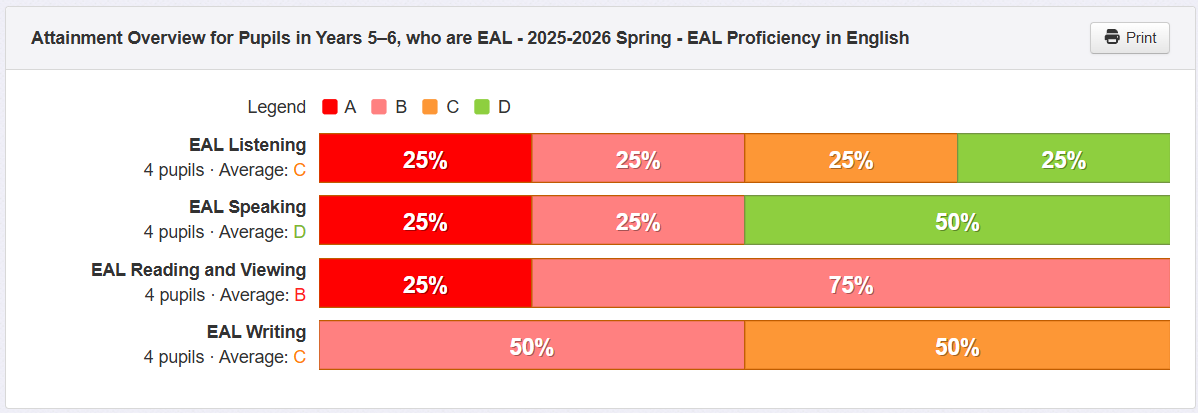
Note that the colours here do not represent the same ‘above average’ (etc.) rating as with other assessments - see the Colouring System and Summative Assessment sections above for more information.
Assessments can be brought into any of Insight's reports as usual. As a starting point, the Progress Matrix is a good way to look at your EAL learners' changes in proficiency over time, and the Tables report is great for building a profile of lots of pupils' data one on page.
Early Years
The Bell Foundation has produced guidance on EAL in EYFS which includes a section on how best to use the Framework in Early Years settings. This guidance can be accessed from this page: EAL Assessment Framework – EYFS - The Bell Foundation.
Further Support
For technical support with the setup and assessment of the Framework in Insight, please contact us.
For guidance on how best to embed the Framework in your school, The Bell Foundation offers free guidance and training for schools and practitioners looking to learn more.
