Understanding and using Phonics Recheck Score by end of Year 2
 Updated
Phonics screening check passing by end of Year 2 is a calculated assessment that brings together pupils’ Phonics Screening Check results from Year 1 and the Year 2 recheck.
It allows you to report whether pupils met the expected standard by the end of Year 2, including those who already met the standard in Year 1.
What does “by end of Year 2” mean?
“By end of Year 2” means by the end of Year 2, whether a pupil met the expected standard in Year 1 or in the Year 2 recheck.
Pupils who met the standard in Year 1 do not normally need to take the Year 2 recheck. Their Year 1 scores are included when reporting attainment by the end of Year 2.
For pupils who needed to take the Year 2 recheck, their recheck results are used.
The measure therefore covers the Year 2 cohort, including pupils who already met the standard in Year 1.
Example
A Year 2 cohort has 30 eligible pupils:
- 24 pupils met the standard in Year 1.
- The remaining six pupils took the Year 2 recheck.
- Four of those six pupils met the standard in the recheck.
In total, 28 of the 30 pupils met the standard by the end of Year 2, giving a result of 93%.
How does Phonics Score by Y2 work?
Phonics Score by Y2 is calculated from the Phonics Screening Check results already recorded in Insight. You do not need to enter a separate set of scores for this assessment.
It brings together the Year 1 results for pupils who met the standard and the Year 2 recheck results for pupils who needed to take the check again.
This gives you a single assessment to use when reporting phonics attainment by the end of Year 2.
For help recording or importing the original results, see Entering and exporting Phonics Screening Check scores.
Adding Phonics Score by Y2 to a Tables report
- Go to Reports > Tables and open an existing table or create a new one.
- Select the pupils you want to include.
- Click Add Column, then choose Assessment Column.
- Select the following assessment settings:
- Year Group - Year 2
- Term - Summer (2)
- Assessment - Phonics Score by Y2
- Subject - Reading
- Cell Format - Evaluated Mark
- Summary - Average or % On track or better to suit analysis requirements
- Add the column to your table.
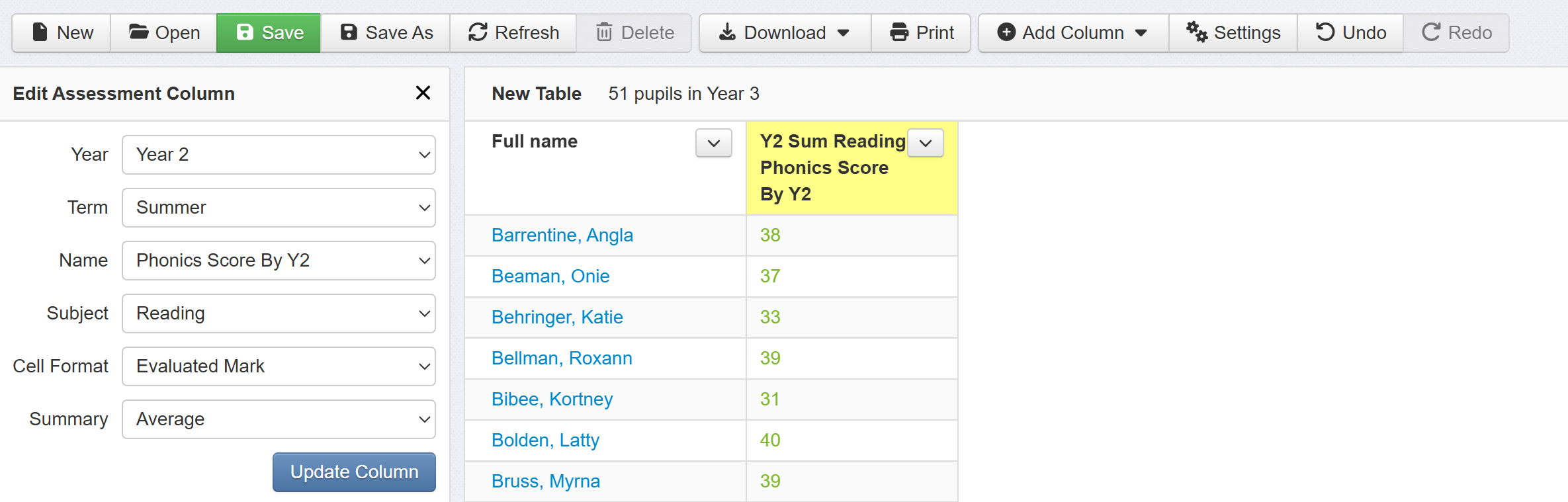
To show a percentage meeting the standard in the summary row, choose % On track or better as the column’s summary option.
You can also use Group Pupils to compare results for different pupil groups.
Adding Phonics Score by Y2 to the Attainment Overview
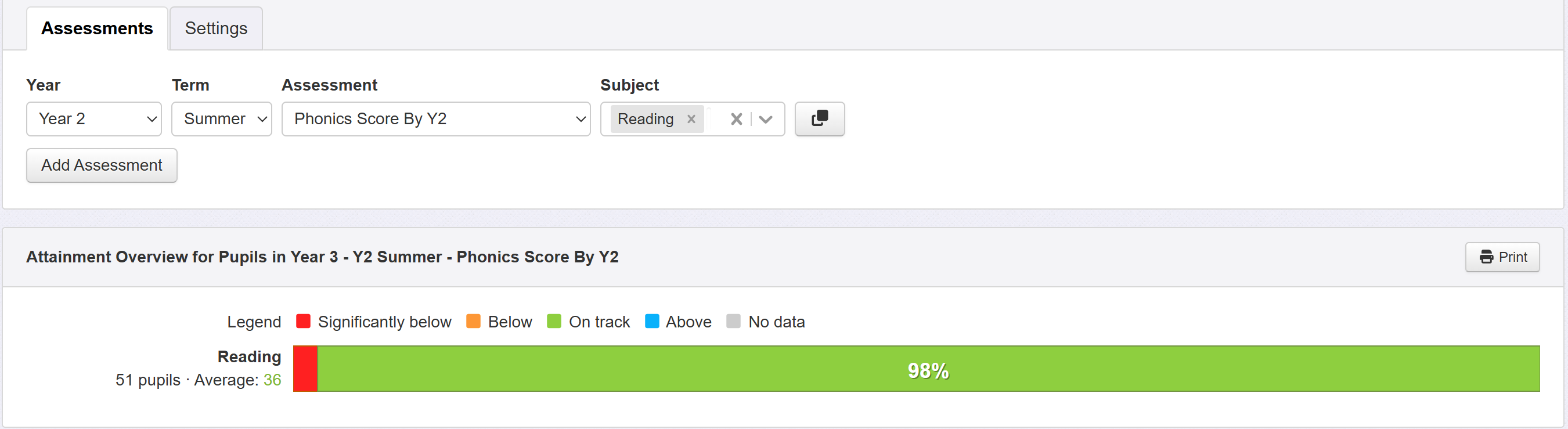
Select Phonics Score by Y2 as the assessment and choose the Year 2 summer assessment period for the cohort you are reporting on.
You can then view the attainment breakdown and use the usual grouping and filtering options.
Understanding the Statutory Assessments report
The Year 2 phonics measure in the Statutory Assessments report shows the percentage meeting the standard by the end of Year 2. It includes pupils who met the standard in Year 1 as well as those who met it in the Year 2 recheck.
It therefore differs from the percentage passing among pupils who took the Year 2 recheck.
Click the school percentage to view the pupils and assessments behind the figure.
For details of pupil inclusion and how assessment codes affect the calculation, see the help guides on Statutory Assessment Report and Statutory Assessment report Codes and Categories.
